Your subscription and what it unlocks
Who this is for: All members with a paid profile (Aspirant, Recruiter, or Service Provider). What you'll learn: What your subscription covers, the stages it moves through, what happens if it lapses, how to renew, and what boosts are.
Overview
Most profile types on Cine Talent India require a subscription — a paid plan that gives your profile access to the platform's features. Your subscription is tied to a specific profile. When it is active, you can use the features included in your plan. When it lapses, some features become limited until you renew.
Guardian profiles are always free and do not need a subscription.
What a subscription unlocks
Depending on your plan, a subscription can unlock:
- The ability to make your profile searchable (visible in search results).
- Applying to jobs (Aspirant).
- Creating projects and posting jobs (Recruiter).
- Listing products and services in the marketplace (Service Provider).
- File storage space in your Drive.
- Access to your Showcase.
- Other platform features as defined by the plan you chose.
Higher-tier plans include more storage, more listings, and more advanced features. You can see exactly what your current plan includes in the Subscription section of your profile settings.
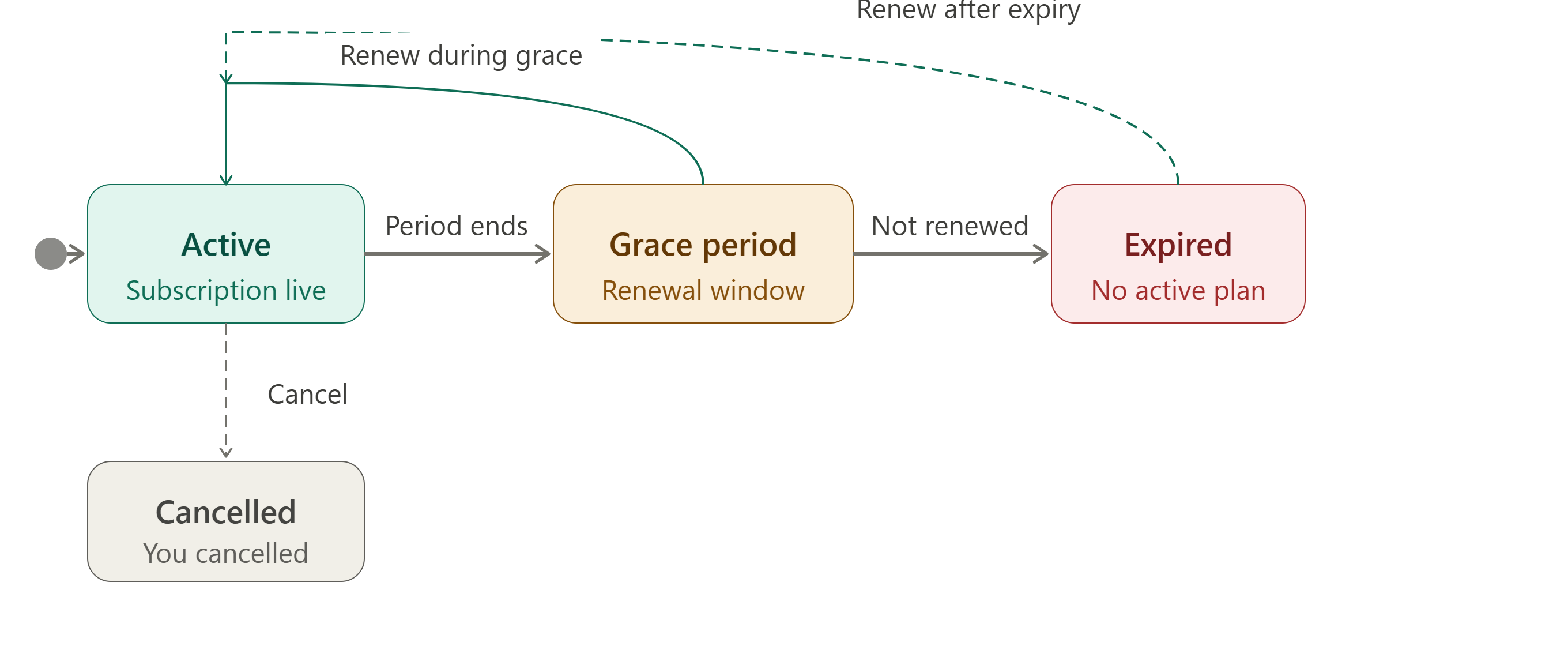
Subscription stages
Active
When you pay for a plan and it is confirmed, your subscription becomes Active. This is the normal working state.
In this stage:
- All features included in your plan are available.
- Your profile can be made searchable.
- You receive the full benefit of your chosen plan until the renewal date.
Grace period
If your subscription reaches its end date without being renewed, it enters a Grace Period rather than cutting off immediately. This short window gives you time to renew without losing access right away.
In this stage:
- Your subscription is technically expired, but a short grace window keeps most features working temporarily.
- You will receive reminders to renew.
- Renewing during the grace period restores your subscription to Active without interruption.
The grace period is time-limited. If you do not renew within it, the subscription moves to Expired.
Expired
If the grace period passes without renewal, your subscription is Expired.
In this stage:
- Features that require a subscription are no longer available.
- Your profile may be hidden from search results.
- Your data, files, and profile content are preserved — nothing is deleted.
- You can renew at any time to restore full access.
How to renew
- Make sure the profile you want to renew is active.
- Go to Profile in the sidebar, then find the Subscription section.
- Tap Renew or Buy a plan and choose your plan.
- Complete payment. Your subscription is restored to Active as soon as the payment is confirmed.
What are boosts?
Boosts are optional temporary upgrades you can purchase on top of your regular subscription. Think of them as short-term enhancements for a specific feature — for example, extending your ability to apply to certain jobs even when your profile is in a limited visibility mode, or unlocking a short-term increase in a specific feature limit.
Key things to know about boosts:
- A boost is separate from your subscription and does not replace it.
- Each boost covers one specific feature or capability and lasts for a defined period.
- You can have multiple boosts active at the same time.
- When a boost expires, you return to the access level your plan normally provides.
- Boosts are available from the platform's store or from within the relevant section of your workspace.
Subscription stage diagram
Common questions
Will I lose my data if my subscription expires? No. Your profile content, files, projects, and applications are never deleted when a subscription expires. Expiry only affects access to features, not your stored data.
What features are restricted when my subscription expires? The exact restrictions depend on your profile type and plan. Generally, your profile may be hidden from search results and some creation features (posting new jobs, adding catalogue items) may be disabled. Renewing restores everything.
Can I upgrade my plan? Yes. Visit the Subscription section in your profile settings and look for an upgrade option. The remaining value of your current plan is typically carried forward.
Can I cancel my subscription? Yes. Cancellation stops your subscription from renewing. Your access continues until the current paid period ends, after which the subscription enters the grace period and then expires if not renewed.
Do boosts require an active subscription? Boosts work on top of a subscription. Some boosts may require your subscription to be Active in order to function. Check the boost details before purchasing.
My subscription shows as Active but some features are still unavailable. Why? Check that your profile is complete and set to Searchable (if the feature requires visibility). Some features also depend on your specific plan tier — higher tiers include features that lower tiers do not. Review your plan details in the Subscription section.
Related help
- Creating your first profile
- Account and profile settings
- How your profile moves through stages