What happens to your job application
Who this is for: Aspirants who have applied or are considering applying for a job. What you'll learn: Every stage your application can reach, what the recruiter is doing at each point, and what actions you can take.
Overview
When you apply for a job, your application enters a workflow managed by the recruiter. You cannot see all the recruiter's internal steps, but the platform keeps you informed of the key milestones: whether you are still being considered, whether you have been shortlisted, and whether you have been selected or not. You also have the option to withdraw at any time.
Before you apply
To apply for a job, your profile must be complete. An incomplete profile cannot submit an application. Make sure all required fields on your profile are filled in before you browse jobs.
Some jobs may also require you to make your profile searchable (publicly visible) before applying. Check the job listing for any specific requirements.
The application stages
Applied
As soon as you submit your application, it is in the Applied stage. The recruiter can now see your application in their list.
What this means for you:
- Your application has been received successfully.
- You will see the job listed under "My Applied Jobs" in your workspace.
- You can still withdraw your application at this point.
Under review
When the recruiter begins actively looking at your application, it moves to Under Review. This means someone on the recruiting team has opened your submission.
What this means for you:
- The recruiter or a reviewer is evaluating your profile, attachments, and any answers you provided.
- You cannot add or change your application at this stage.
- You can still withdraw if you change your mind.
Shortlisted
If the recruiter likes your application, they will move it to Shortlisted. This is a positive sign — you have passed an initial filter.
What this means for you:
- You are being considered alongside a smaller group of candidates.
- You may be asked to provide additional materials or attend an audition, depending on the job's requirements.
- You will receive a notification when this happens.
Selected
If you are chosen, the recruiter marks your application as Selected (the platform uses the term "Invited" internally, but from your perspective this means you have been selected for the role or next step).
What this means for you:
- You have been offered or offered the opportunity to proceed.
- The recruiter may contact you through the platform's messaging system or via the contact details on your profile.
- This is the final positive outcome.
Not selected
If the recruiter decides not to proceed with your application, it will be marked as Not Selected.
What this means for you:
- Your application is closed.
- You will typically receive a notification.
- You are free to apply to other jobs.
Withdrawn
At any point before a final decision, you can choose to Withdraw your application.
What this means for you:
- Your application is removed from the recruiter's active list.
- Withdrawing is permanent for that application — you cannot re-apply to the same job posting once you withdraw.
- This is the right action if you have accepted another offer or are no longer available.
Stage diagram
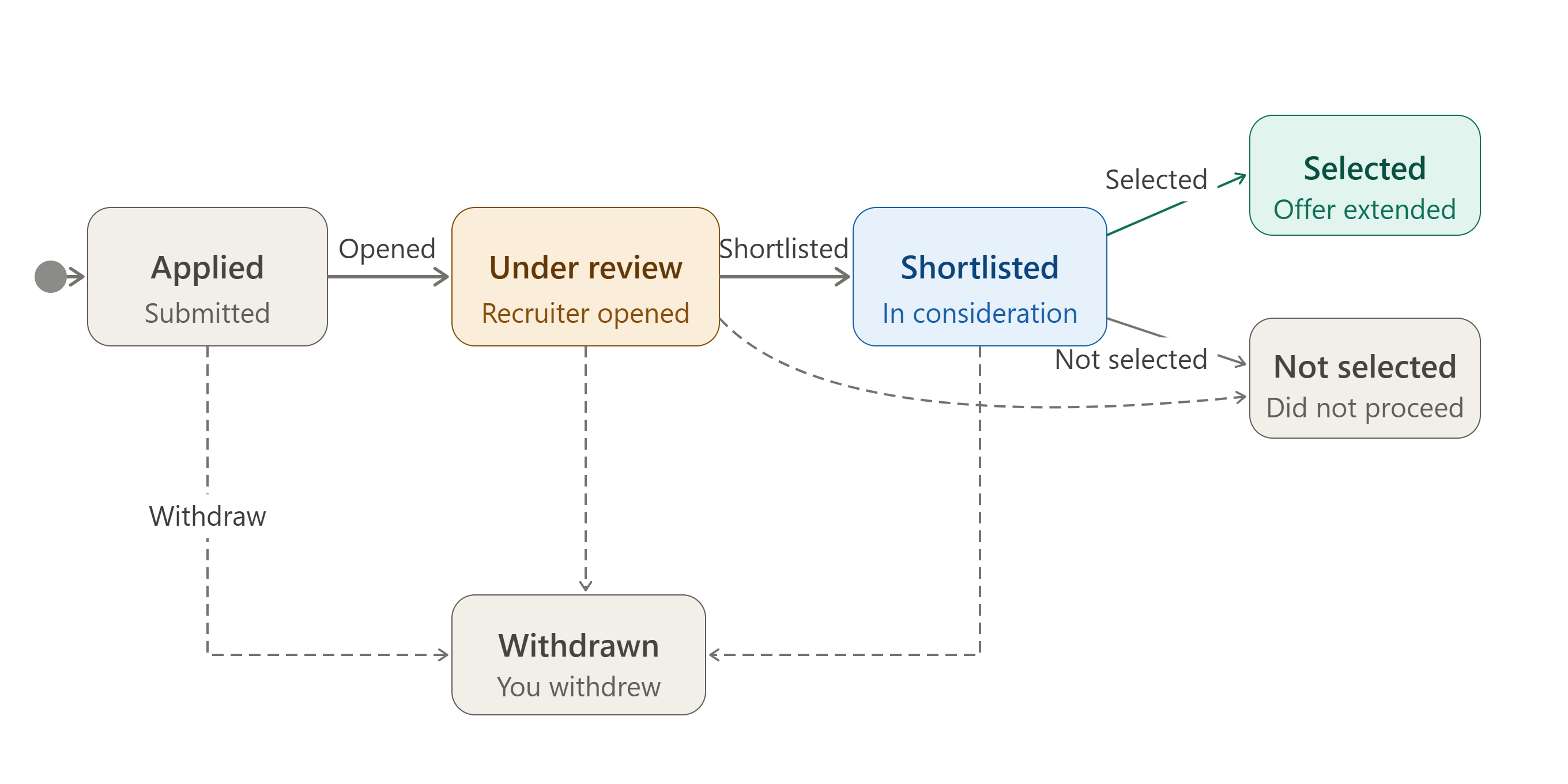
The recruiter's view vs. yours
The recruiter sees more internal detail than you do. They can assign reviewers, add notes, score candidates, and run internal consolidation steps. You only see the headline stage of your application — you do not see internal scores, reviewer notes, or other candidates' details. This is by design to protect privacy on both sides.
What you can and cannot do at each stage
| Stage | You can | You cannot |
|---|---|---|
| Applied | Withdraw | Edit submitted details |
| Under Review | Withdraw | Edit submitted details |
| Shortlisted | Withdraw | Edit submitted details |
| Selected | Contact recruiter via messaging | Withdraw (already finalised) |
| Not Selected | Apply to other jobs | Reverse the decision |
| Withdrawn | Apply to other jobs | Resubmit to the same job |
Common questions
How do I know when my application has been reviewed? You will receive a notification when your application moves to Under Review, Shortlisted, or reaches a final decision. Check your notification bell regularly.
Can I edit my application after I submit it? No. Once submitted, the application captures your profile and attachments at that moment. Keep your profile up to date so that future applications always reflect your current details.
What should I do if I have not heard back for a long time? Application timelines vary by production. The "My Applied Jobs" list shows the current stage of each application. If a job has been closed by the recruiter without a decision on your application, it may show as closed.
Can I apply to the same job twice? No. Once you have applied or withdrawn from a job, you cannot resubmit to that same posting.
What is the difference between Shortlisted and Selected? Shortlisted means you are in a group still being considered. Selected means the recruiter has specifically chosen you and wants to move forward with you.
Do I need to be Searchable to apply? Your profile must be complete to apply. Some jobs may also require your profile to be publicly visible. Check the job's listing requirements before applying.
Related help
- How a job moves through stages
- How your profile moves through stages
- Your subscription and what it unlocks