Project stages explained
Who this is for: Recruiters and Service Providers who own or are members of projects. What you'll learn: The stages a project moves through, what each stage means for the people and content inside it, and how to move a project to its next stage.
Overview
Every project on Cine Talent India has a stage that reflects its current status in the production lifecycle. The stage affects what the project owner and members can do — including posting jobs, uploading files, and adding events. Understanding stages helps you manage your project at the right pace and know when to wrap things up.
The project stages
Active
When a project is created, it is immediately in the Active stage. This is the working state — everything is open and in progress.
In this stage:
- Project members can be invited and can join.
- Jobs can be created and posted within the project.
- Events linked to the project can be created and managed.
- Files can be uploaded to the project Drive.
- Gallery items can be added.
- The project is visible to its members and can be shared with others as configured.
Most of your day-to-day work happens while a project is Active.
Completed
When production finishes, the project owner can mark the project as Completed. This signals that the main work is done.
In this stage:
- The project record and all its content (files, jobs, events, members) are preserved.
- New jobs cannot typically be created or posted within a completed project.
- Members can still view and access project content.
- The project remains in members' "Associated With" lists.
Marking a project as Completed is a way to keep an accurate record of your production history without deleting anything.
Archived
Archiving is the final stage. The project owner can move a Completed project to Archived when they want to put it into long-term storage.
In this stage:
- The project and all its content remain accessible for review.
- No new jobs, events, or members can be added.
- Archived projects are typically not shown in active project lists, but can be found by the owner.
Archiving is useful to keep your active project list clean while preserving the full record of past productions.
Stage diagram
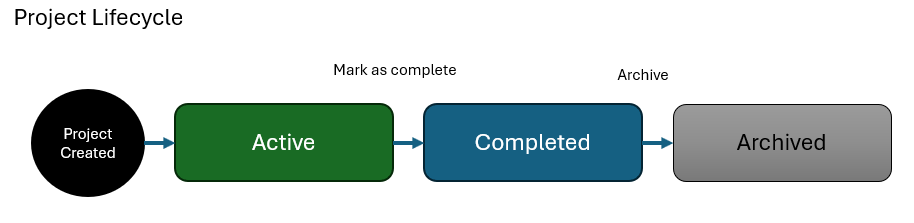
What happens to project content at each stage
| Content | Active | Completed | Archived |
|---|---|---|---|
| Project members | Can be added / removed | Remain; no new invites | Remain; read-only |
| Files (Drive) | Upload / download | Download and view | Download and view |
| Jobs | Create and manage | View only | View only |
| Events | Create and manage | View only | View only |
| Gallery | Add / remove | View | View |
Common questions
Who can change the project stage? Only the project owner can move a project from Active to Completed, and from Completed to Archived. Members with specific permissions may be able to assist, but the stage change itself is an owner action.
Can I reopen a Completed project? Completed projects can be returned to Active by the project owner if more work is needed. Contact the platform support team if you are unable to find this option.
Can I reopen an Archived project? Archived projects are intended for long-term read-only storage. If you need to reactivate an archived project, contact the platform support team.
Do members lose access when a project is Completed or Archived? No. Members can still view the project and its content. The main change is that new activity (new jobs, new members, new files) is restricted.
What happens to jobs inside a project when it is Completed? Jobs that are still open when a project is completed should be closed first. If they are left open, they remain in their current state but cannot be progressed further within a completed project.
Related help
- How a job moves through stages
- How events move through stages
- How your profile moves through stages