Reviewing and managing applications
Who this is for: Recruiters managing applications for a job What you'll learn: Where to see applications, what each pipeline stage means, how multiple reviewers collaborate, how to give a final decision, and what applicants are told
Overview
When a job is live and in the evaluation phase, applicants start arriving. The platform gives you a structured pipeline to manage them: from initial application through shortlisting, team review, consolidation, and a final decision. Multiple reviewers can work through applications independently and then bring their assessments together for a final call.
Where to see applications
Open your job from the Workspace and tap Applications (or look for the Applications section in the feature cards). You see a full list of everyone who has applied, with tabs to filter by stage.
You can only click through to individual applicant details while the job is in evaluation status. Once the job moves to a different state, the list remains visible but you cannot open individual application profiles.
The application pipeline
Applications move through the following stages:
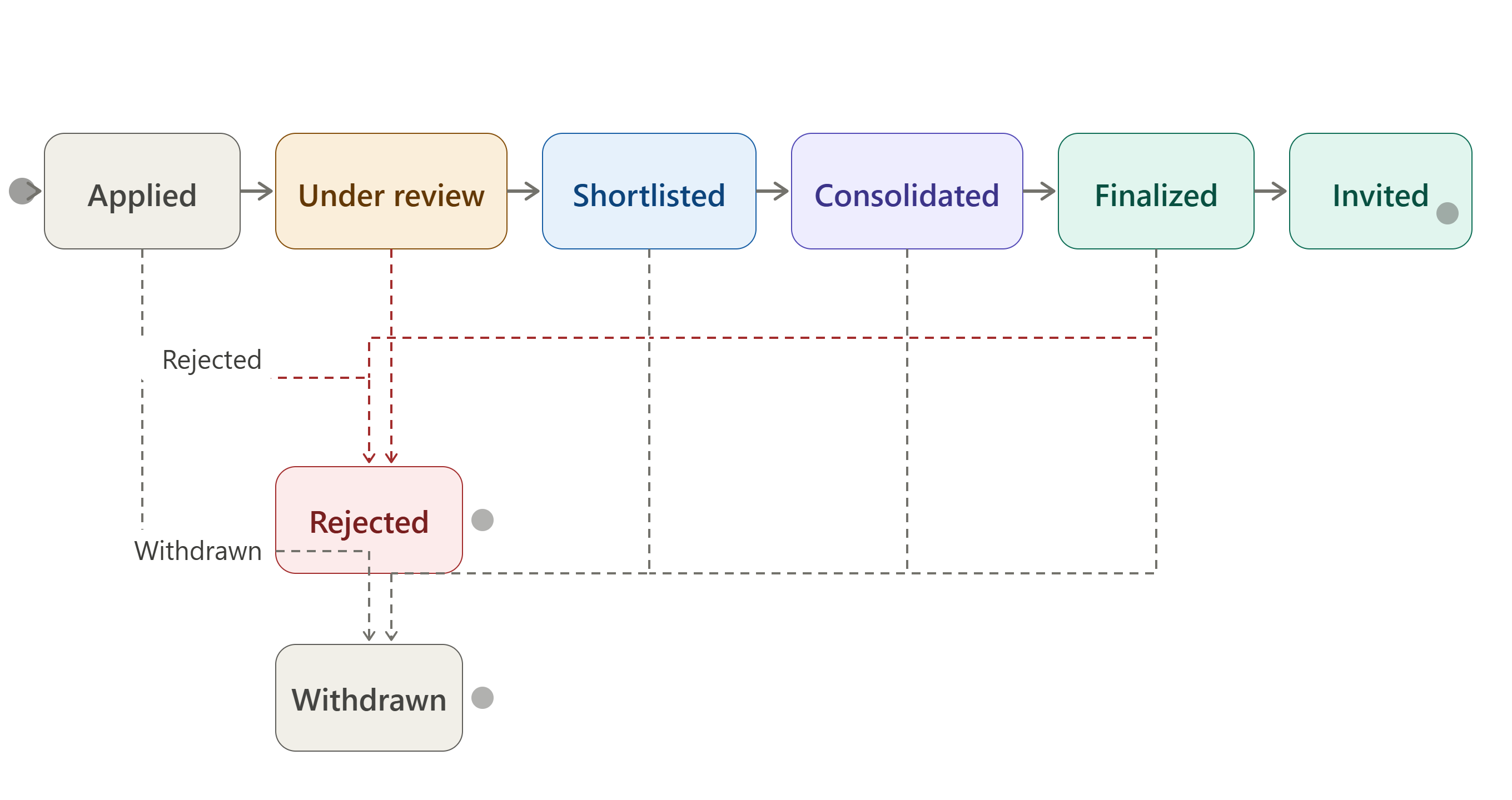
Applied
The applicant has submitted their application. You can see their profile and any materials they attached. No action is required immediately — applications sit here until you are ready to begin reviewing.
Under Review
When you open an application and begin assessing it, it moves to Under Review. At this stage your team's designated reviewers can each enter their own score and notes. Each reviewer's assessment is private to them — reviewers cannot see each other's scores at this stage.
Shortlisted
An applicant you want to carry forward to the next stage. Move them to Shortlisted when you are confident they are worth a deeper look. Shortlisted applicants are visible to the whole review team.
Consolidation
Once all reviewers have submitted their assessments, the person running consolidation brings the individual reviews together. The consolidation view shows each reviewer's score alongside a combined picture. This is where the team compares notes and decides who to take forward.
Only the designated consolidator can trigger the consolidation action. The consolidation view is available from the Consolidation tab in the Applications section.
Finalized
After consolidation, the shortlisted candidates you have decided on are marked Finalized. This means you are ready to make them an offer or invite them to the next step (such as an audition event).
In some workflows you can also finalize a shortlisted applicant directly without going through the consolidation step.
Invited
Once finalized, you can send the applicant an invitation — typically to an event linked to the job (an audition, a screen test, and so on). Invited is the positive terminal state: the applicant has been selected and called in.
Rejected
An applicant you are not taking forward. You can reject at any stage. This is a terminal state and cannot be reversed.
Withdrawn
The applicant has withdrawn their own application. This is a terminal state.
How multiple reviewers collaborate
You can assign reviewers to a job from the job's Settings page. Each reviewer can access the Applications section and open individual applications to score and add notes. Scores and notes are private per reviewer until consolidation.
The consolidator (set in Settings) is the only person who can run the consolidation step. Once consolidation is triggered, the combined view becomes available to the consolidator and the job owner.
How to give a final decision
- Work through applications from the shortlist.
- Run consolidation when your reviewers have finished their assessments.
- From the consolidation view, mark the candidates you want as Finalized.
- From the Finalized tab, select applicants and use Invite to call them forward — or use Reject for those you are not proceeding with.
The Finalized tab also shows a link to any event associated with the job, so you can invite candidates directly to an audition or shoot day.
What applicants are told
Applicants can see their current status in their applied-jobs tracker. They see the stage label (Applied, Shortlisted, Finalized, Invited, Rejected, Withdrawn) but not your internal notes or scores. They are not sent automatic notifications at every stage change — notifications are sent at key milestones.
Common questions
Can a rejected applicant re-apply? No. Once an application is rejected it is in a terminal state and cannot be undone. If you want to reconsider a rejected applicant, contact support.
What happens to shared files when an applicant is rejected? Any files the applicant attached to their application are retained in the application record for reference. The applicant's access to your job's reference materials may be revoked.
Can I add more reviewers after the job is already live? Yes. Open the job settings and update the reviewer list at any time before consolidation.
Can I reject and then re-shortlist someone by mistake? No. Rejection is terminal. Be sure before you reject.
Can two reviewers see each other's notes? Not until consolidation. Each reviewer's assessment is private. The consolidation step brings them together for comparison.
What is the difference between Shortlisted and Finalized? Shortlisted means you want to evaluate the applicant further. Finalized means you have decided to proceed with them — it is the pre-offer or pre-invite stage.
Related help
- Creating and posting a job
- Finding and applying for jobs
- Events — creating and managing